
Calibration Score
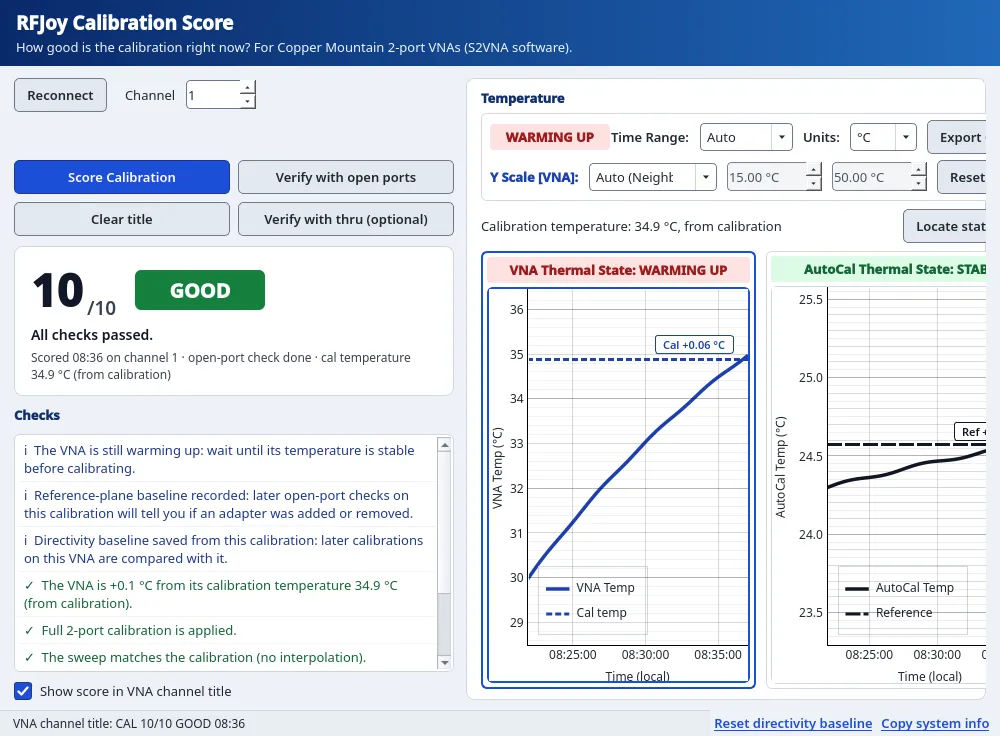
Scores the active VNA calibration from 0 to 10 using calibration-state, error-term and temperature-drift checks, with optional open-port and thru verification. Read-only.
- Analyzer
- Copper Mountain 2-port VNA with S2VNA software
- PC
- Windows 11, connected to the VNA
- Extra hardware
- None. AutoCal module optional, for the module temperature trend.
Key features
- Scores the active channel calibration 0–10 and grades it GOOD (7–10), FAIR (4–6) or POOR (0–3); the dominant finding is named.
- Calibration state: error correction on/off, calibration type (full 2-port SOLT2, one-path, 1-port, response), uncalibrated traces, interpolated or extrapolated calibration, port extension.
- Error-term checks — directivity (ED) against a per-analyzer baseline saved from the first GOOD calibration; ripple and roughness of the tracking terms.
- Temperature drift: RF-block temperature vs. temperature at calibration. Penalty from 1 °C; score capped at 6 above 3 °C; recalibration advised above 4 °C.
- Warming-up / stable indication from the RF-block temperature rate (stable below 0.03 °C/min).
- AutoCal module temperature plotted alongside the RF-block temperature, with a reference line.
- Calibration temperature from calibrations logged by the plugin, or recovered for a recalled state by matching ED, ES and ER against saved S2VNA state files.
- Optional verification: open-port check (passivity, ripple, reference-plane delay vs. baseline to detect an added or removed adapter) and thru check (passivity, S21/S12 reciprocity, match).
- Optional score in the VNA channel title (e.g. "CAL 8/10 GOOD 16:41"); the previous title is restored on Clear title, on calibration change and on exit.
- Read-only command allow-list. Calibration coefficients, system files, sweep and trigger settings are not changed.
Requirements and specifications
| Score | 0–10; GOOD 7–10, FAIR 4–6, POOR 0–3 |
|---|---|
| Checks | Calibration state, error terms (ED baseline, tracking ripple), temperature drift; optional open-port and thru verification |
| Temperatures | VNA RF block; AutoCal module (reference) |
| Tested on | Copper Mountain 2-port VNAs |
| Runs as | S2VNA plugin |
| Operating system | Windows 11 |
| VNA access | Read-only; optional channel title is the only write |
| License | Perpetual; bound to a PC, a VNA serial number or both; includes 1.x updates |
| Trial | 1 week, all functions, one PC |
Workflow
- Score the active calibration. Calibration state, error terms and temperatures are read from the analyzer.
- Verify (optional): leave the test ports open, or connect a thru, and run the verification.
- Act on the dominant finding: recalibrate, reconnect, or measure.
VNA access
All analyzer access goes through a read-only command allow-list. The optional channel title is the only value written; the previous title is restored afterwards.
Frequently asked questions
Does the plugin change anything on the analyzer?
Only the optional channel title. All other access goes through a read-only command allow-list; calibration coefficients, system files, sweep and trigger settings are not changed.
Which findings reduce the score?
Calibration state (type, interpolation, extrapolation), error terms (directivity against the saved baseline, tracking ripple and roughness), temperature drift since calibration and, if run, open-port and thru verification. Findings with a common cause are counted once.
When is recalibration advised?
When the RF-block temperature differs from the calibration temperature by more than 4 °C. Above 3 °C the score is capped at 6.
Which analyzers are supported?
Tested on Copper Mountain 2-port VNAs. For other analyzers, contact us before purchase.
How does the free trial work?
Request a trial; we email the installer. Send the machine ID shown on the activation screen and we return a 1-week trial license (all functions, one PC).
How is a license purchased?
Request a quote. Payment by secure PayPal invoice. The perpetual license file is sent by email and includes 1.x updates.
Request a 1-week trial
Installer sent by email. Send the machine ID from the activation screen; a 1-week trial license (all functions, one PC) is returned by email.