
Symmetric Fixture Removal
De-embeds a symmetric 2-port test fixture with the IEEE P370 NZC 2x-thru method and applies the fixture models in the analyzer's fixture simulator.
- Analyzer
- Copper Mountain 2-port VNA with S2VNA software
- PC
- Windows 11, connected to the VNA
- Extra hardware
- 2x-thru fixture (the two fixture halves connected back to back)
Key features
- Measures the 2x-thru and extracts left and right fixture models with IEEE P370 NZC; models are saved as Touchstone files referenced to the system Z0.
- Loads the fixture models into the S2VNA fixture simulator (2-port de-embedding, ports 1 and 2); the analyzer displays de-embedded DUT data in real time.
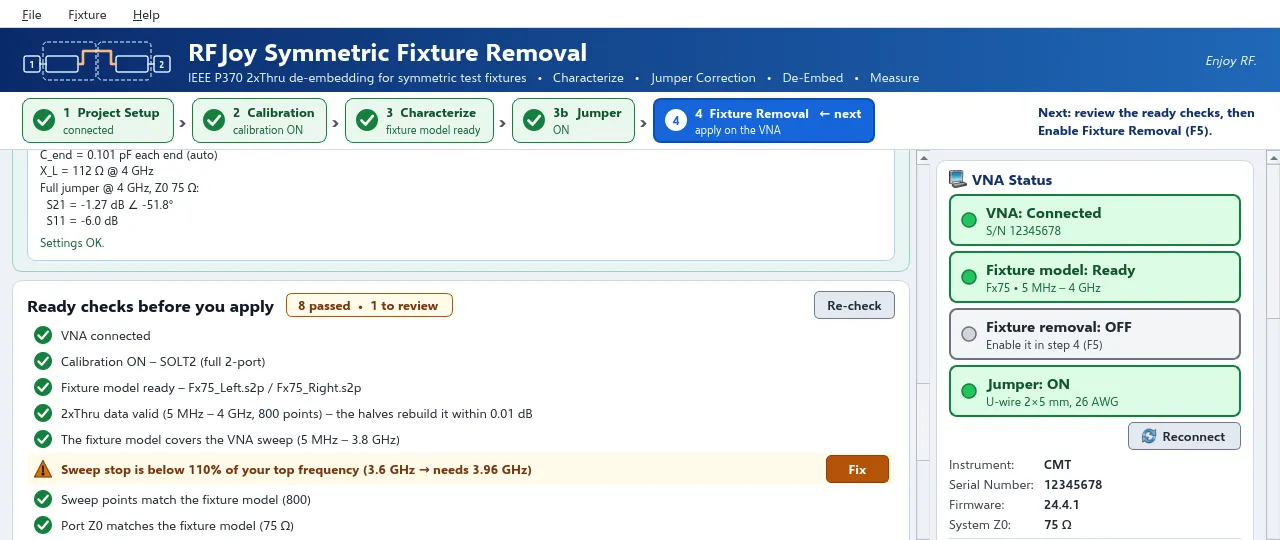
- Pre-apply checks: error correction and calibration type (full 2-port SOLT2 expected), model frequency coverage, sweep points, port Z0, sweep stop ≥ 110 % of the top frequency of interest (one-click sweep-stop correction).
- Cascade check — rebuilds the 2x-thru from the extracted halves and reports max |ΔS21|; flagged above 0.05 dB.
- Jumper correction for 2x-thrus joined by a straight wire, U-shaped wire or PCB trace without ground plane: geometric model or measured .s2p, removed from each half with P370-aware correction.
- Time-domain view (low-pass, Kaiser or Hamming window): impedance vs. time or distance (velocity factor), fixture symmetry check (max |ΔZ| ≤ 2 Ω), S21 impulse response and delay; CSV export.
- Builds a fixture model from a saved 2x-thru Touchstone file, without a new sweep.
- Reads the system Z0 from the analyzer; 2x-thru data with a different Touchstone reference impedance is renormalized or relabeled.
Requirements and specifications
| Method | IEEE P370 NZC 2x-thru, symmetric fixtures |
|---|---|
| De-embedding | S2VNA fixture simulator, 2-port de-embedding on ports 1 and 2 |
| Calibration required | Full 2-port (SOLT2) at the fixture connectors, performed on the VNA |
| Tested on | Copper Mountain 2-port VNAs |
| Runs as | S2VNA plugin |
| Operating system | Windows 11 |
| License | Perpetual; bound to a PC, a VNA serial number or both; includes 1.x updates |
| Trial | 1 week, all functions, one PC |
Workflow
- Calibrate full 2-port (SOLT2) at the cable ends that mate with the fixture.
- Characterize the 2x-thru. A single sweep is taken and split into left and right fixture models (IEEE P370 NZC).
- Check the model: pre-apply checks, cascade check, time-domain symmetry.
- Apply: the models are loaded into the fixture simulator; the VNA displays the de-embedded DUT.
Measurement notes
- Set the sweep stop to at least 110 % of the highest frequency of interest; the P370 split has a band-edge error at the last points.
- Use identical frequency points and IF bandwidth for calibration, 2x-thru and DUT.
- With de-embedding on, the 2x-thru should measure as a near-ideal thru. Confirm with a line of known impedance.
Accuracy figures in the user manual are from simulation and are not guaranteed values.
Frequently asked questions
Does the plugin modify the VNA calibration?
No. Calibration is done on the VNA. The plugin measures the 2x-thru, writes the two fixture models and switches the analyzer's fixture-simulator de-embedding on or off.
Does the fixture have to be symmetric?
Yes. IEEE P370 NZC assumes the left and right halves are mirror images. The time-domain view checks symmetry (max |ΔZ| ≤ 2 Ω).
What if the 2x-thru halves are joined by a jumper that is absent in the DUT fixture?
Enable jumper correction and describe the jumper (straight wire, U-shaped wire, PCB trace or a measured .s2p). Half of the jumper is removed from each fixture model.
Which analyzers are supported?
Tested on Copper Mountain 2-port VNAs. For other analyzers, contact us before purchase.
How does the free trial work?
Request a trial; we email the installer. Send the machine ID shown on the activation screen and we return a 1-week trial license (all functions, one PC).
How is a license purchased?
Request a quote. Payment by secure PayPal invoice. The perpetual license file is sent by email and includes 1.x updates.
Request a 1-week trial
Installer sent by email. Send the machine ID from the activation screen; a 1-week trial license (all functions, one PC) is returned by email.